GAAP App - Hardware Setup & Compatibility
To achieve the lowest possible latency and the best sound quality, GAAP App requires an external USB-C Audio interface or adapter. Below you will find the recommended ways to connect your guitar and headphones to your Android device.
Guitar | Instrument - Connection Methods
-
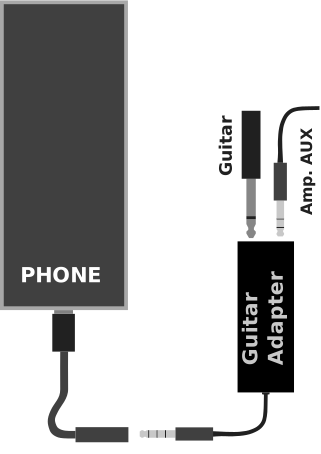
1. Simple USB-C Headphone Adapter:
You can hook a simple USB-C to 3.5mm Headphone Jack adapter that contains a built-in DAC/ADC (Sound Card) directly to your phone. Connect an instrument interface (like an iRig analog) into the 3.5mm jack.
-
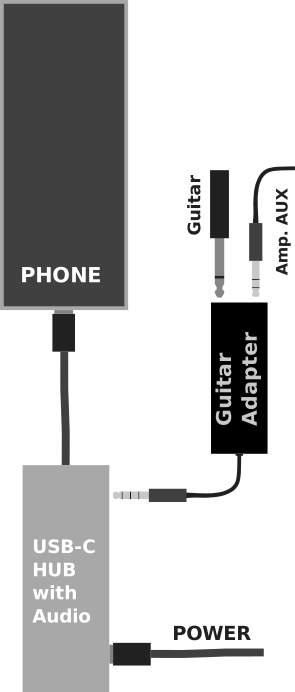
2. USB-C Hub with Integrated Audio:
You can connect a USB-C Hub that features a built-in 3.5mm audio jack. Plug your guitar and headphones into the hub, leaving the main USB-C port of your phone occupied by the hub.
-
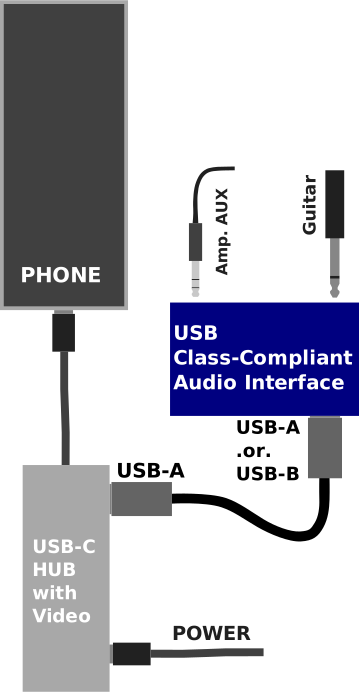
3. USB-C Hub + Dedicated Sound Card + Power Delivery (Recommended):
You can hook up a USB-C Hub that supports Power Delivery (PD) and USB data. Plug a dedicated USB sound card/audio interface into one of the USB-A ports on the hub, and connect your phone charger to the PD port. This allows the phone to be powered permanently while playing!
Hardware Compatibility Statement
The compatibility of the Audio Adapter is heavily dependent on the type of Android phone you use and the manufacturer of the USB-C Adapter. The GAAP app does not limit usage to a certain type or manufacturer. If Android recognizes it as a valid audio device, GAAP will use it.
Important: The USB-C Audio Requirement & Latency
To use this app, you MUST use an external USB-C Audio Device.
Internal phone microphones, phone speakers, and Bluetooth connections have massive inherent delays. Plugging a guitar directly into a standard 3.5mm headphone jack (if your phone still has one) relies on the phone's internal, low-quality analog-to-digital converter. To achieve real-time playing speeds, you must completely bypass the phone's internal audio hardware by using a USB-C DAC Dongle or a Professional USB Audio Interface.
Even with a USB-C interface connected, the execution speed of the audio processing relies entirely on your phone's CPU architecture. Real-time audio DSP requires heavy mathematical calculations. CPUs equipped with modern SIMD (Single Instruction, Multiple Data) architecture can process audio almost instantly.
1. Budget / Entry-Level Phones
These devices typically have slower CPUs lacking advanced SIMD capabilities, combined with broken OS Audio HALs. They physically cannot process audio fast enough for low-latency. If your audio crackles or drops out, you must raise the Latency Multiplier inside the GAAP App Settings to a Safe or Standard setting. You will hear a slight delay, but the audio will remain stable.
2. Flagship & Premium Mid-Range Phones (Samsung S-Series, A54+, Pixel, etc.)
Modern flagship devices, as well as premium mid-range phones (like the Samsung A54), possess the fast CPUs and SIMD architecture required to process complex math instantly over fast USB-C connections. BUT YOU MUST USE A WORKING, COMPATIBLE EXTERNAL USB-C INTERFACE! If you have one connected, you can confidently open the GAAP App Settings and lower the Latency Multiplier to Ultra Low or Insane Low Latency to experience true, professional low-latency response!
Important TROUBLESHOOTING:
If you are using a USB-C Hub and a dedicated Audio Interface (like an iRig HD2) plugged into the hub's USB-A port, you may experience audio dropouts if you unplug the interface. This is a known hardware-level issue with most USB-C Hub controller chips.
The Fix: If you unplug your audio interface from the hub, you must unplug the entire USB-C Hub from your phone, and then plug it back in. This forces the Android OS to reset the USB bus and correctly re-route the audio!
Connecting a New Audio Device (v4.0.21+)
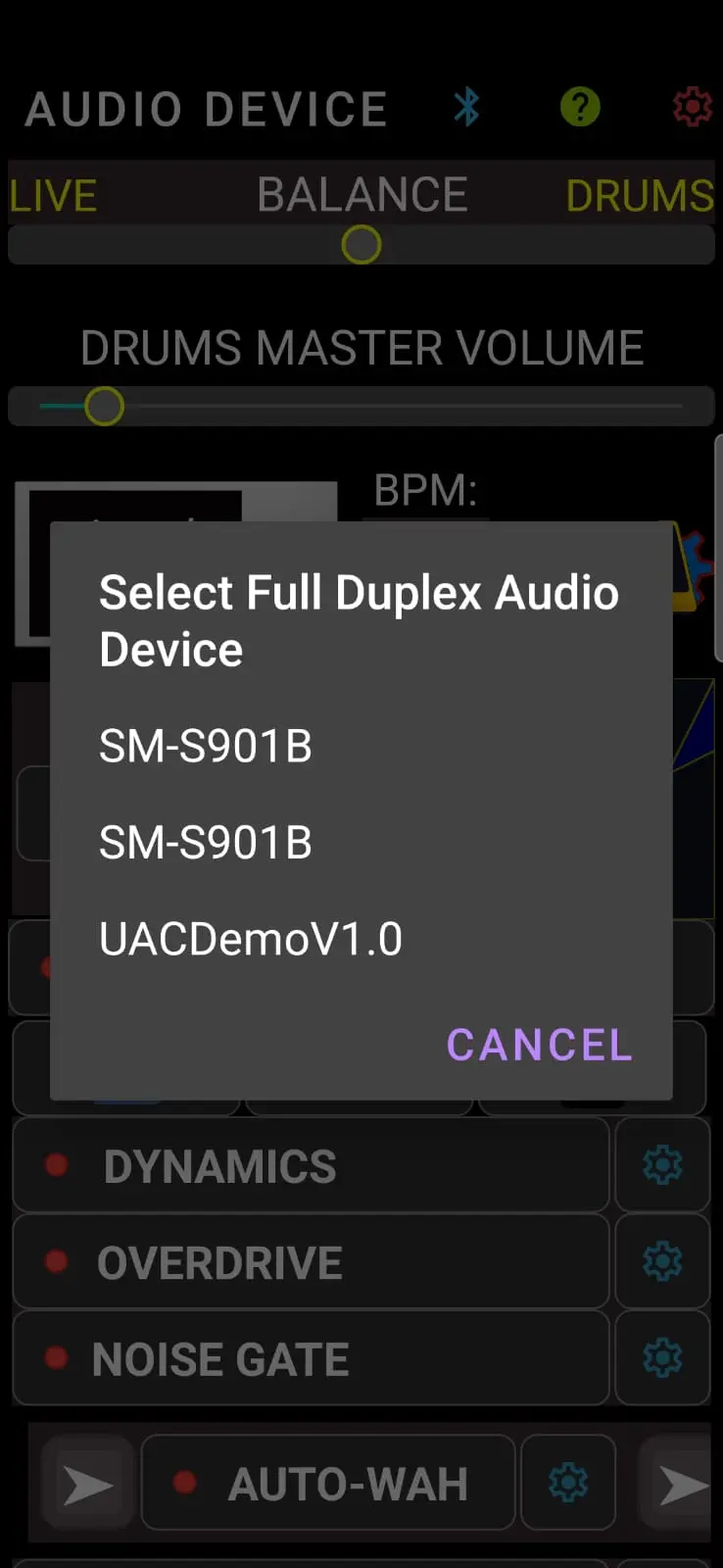
When you plug a compatible USB-C Audio Interface into your phone for the first time while GAAP is running, the app detects it and guides you to activate it:
- Plug in your USB-C Audio Interface. GAAP will show a "New Audio Device Detected" alert.
- Tap the AUDIO DEVICE button (the guitar jack icon) at the top left of the screen.
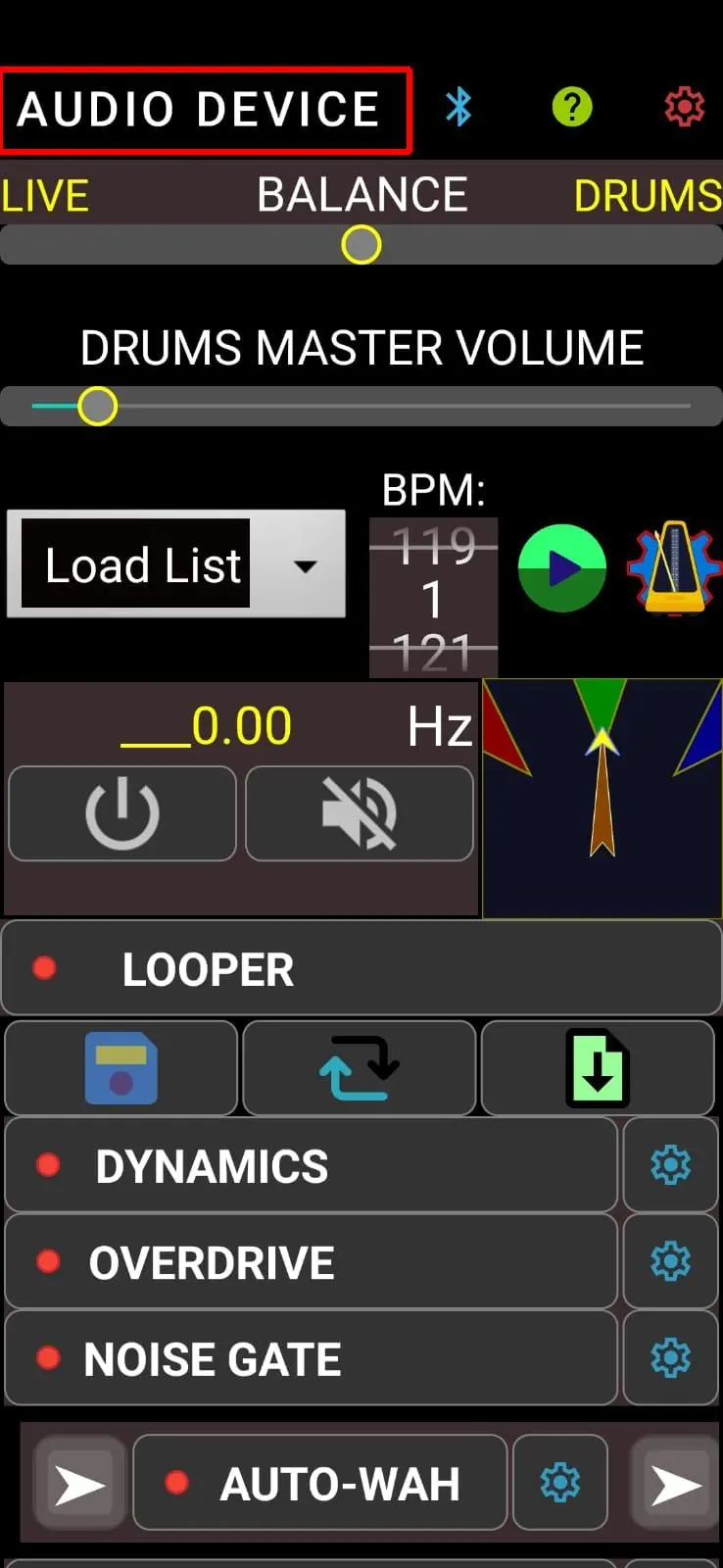
- Tap your Audio Interface in the list. This tells GAAP to remember your preference!
- The audio engine will restart and route high-definition audio through your interface.
Smart Protection & Auto-Reconnect
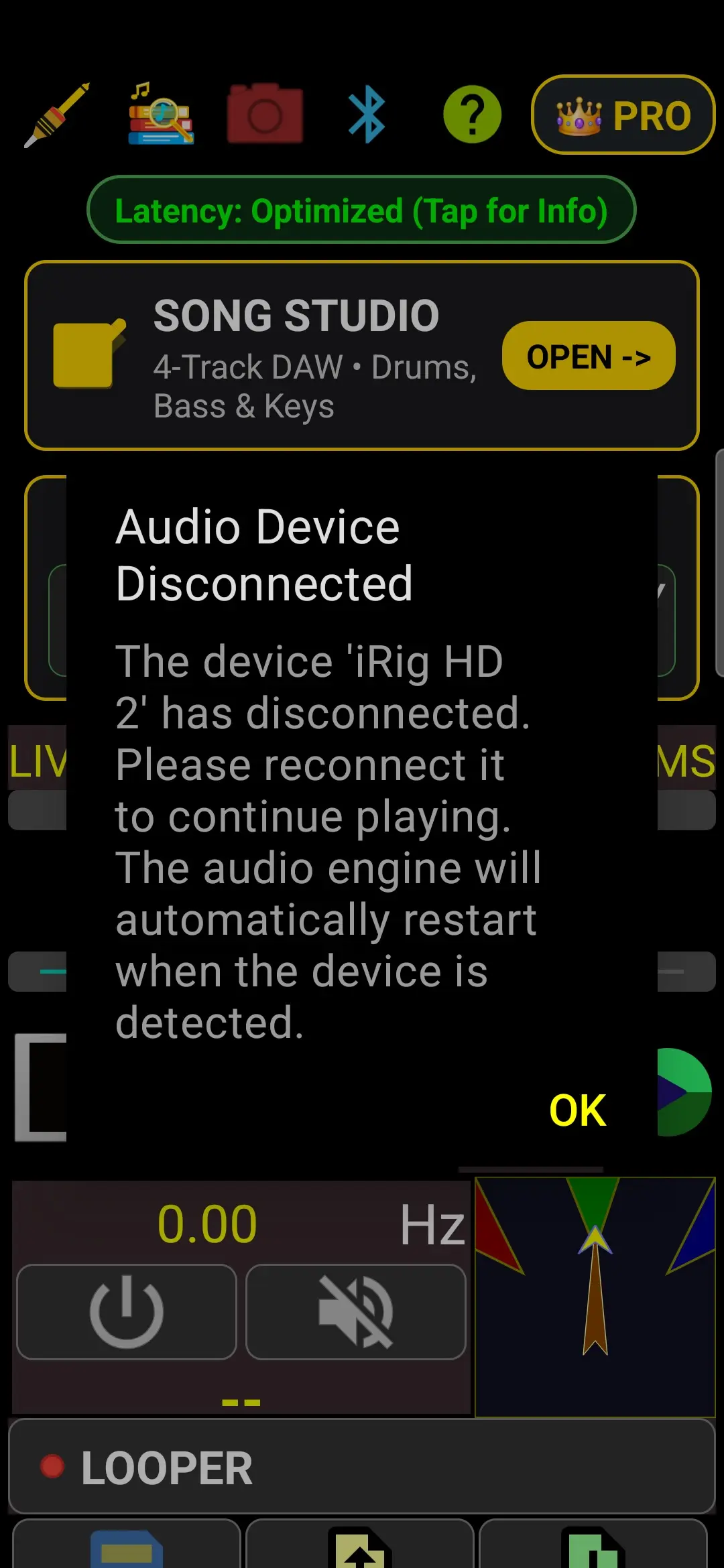
Now that GAAP remembers your preferred device, it actively guards your session against accidental cable tugs:
- GAAP instantly silences the audio engine and displays the "Audio Device Disconnected" alert to prevent sudden feedback squeals or speaker pops.
- Zero-friction reconnect: As soon as you plug the cable back in, GAAP automatically dismisses the alert and brings up the device selection dialog for you—simply tap your device to safely resume playing!
Suggested Compatibility List
Below is our organized list of tested hardware, separated into Dedicated USB Audio Interfaces (studio interfaces and guitar soundcards) and USB-C Audio Adapters & Dongles (DAC/ADC cables and headphone dongles).
1. Dedicated USB Audio Interfaces & Soundcards
Professional desktop and mobile recording interfaces with discrete instrument preamps (Hi-Z), balanced inputs, and dedicated headphone/monitor outputs:
| Manufacturer / Model | Audio Backend Support | Architecture & Performance Notes | ||
|---|---|---|---|---|
| Custom USB Stack | Oboe (AAudio) | OpenSL ES | ||
| FOCUSRITE SCARLETT FAMILY (High-Speed UAC2 Multi-Channel Architecture) | ||||
| Focusrite Scarlett 2i2 4th Gen | ⭐ PASSED | ✔️ Supported | ⚠️ Legacy | Physical hardware verified on Samsung Galaxy A06: XMOS xCORE-200 + Cirrus Logic RedNet-class converters. High-Speed UAC2 multi-channel stream with UAC2 Clock Source locking at 48kHz, 4-channel frame stride unpacking, and dynamic oversampling via sealed UsbScarlettDriver. |
| Focusrite Scarlett Solo 4th Gen | 🟡 Supported (Untested) | Untested | Untested | Supported via isolated UsbScarlettDriver with 2-channel 24-bit slot unpacking and automatic Clock Source locking. |
| Focusrite Scarlett 4i4 4th Gen | 🟡 Supported (Untested) | Untested | Untested | Supported via isolated UsbScarlettDriver multi-channel frame stride decimation and Clock Source entity locking. |
| Focusrite Scarlett 2i2 / Solo (3rd Gen) | 🟡 Supported (Untested) | Untested | Untested | Class-compliant UAC2 High-Speed streaming with dynamic sample-rate adaptation in UsbScarlettDriver. |
| Focusrite Scarlett 2i2 / Solo (2nd Gen) | 🟡 Supported (Untested) | Untested | Untested | Class-compliant UAC2 High-Speed streaming with dynamic sample-rate adaptation in UsbScarlettDriver. |
| PRESONUS FAMILY (High-Speed UAC2 Dual-Rate Oversampling Architecture) | ||||
| PreSonus AudioBox USB 96 / Studio | ⭐ PASSED | ✔️ Supported | ⚠️ Legacy | Physical hardware verified on Samsung Galaxy A06: High-Speed UAC2 (125µs microframe). Dual-rate streaming with 96kHz DAC / 48kHz ADC bridged via 1:2 Hermite cubic oversampling; bit-perfect guitar & drum playback via sealed UsbAudioBoxDriver. |
| PreSonus AudioBox iOne | 🟡 Supported (Untested) | Untested | Untested | Supported via isolated UsbAudioBoxDriver UAC2 microframe streaming with Hermite cubic DAC oversampling. |
| PreSonus AudioBox iTwo | 🟡 Supported (Untested) | Untested | Untested | Supported via isolated UsbAudioBoxDriver dual-channel microframe streaming with Hermite cubic DAC oversampling. |
| PreSonus AudioBox GO | 🟡 Supported (Untested) | Untested | Untested | Supported via isolated UsbAudioBoxDriver class-compliant High-Speed UAC2 architecture. |
| PreSonus Studio 24c / Studio Series | 🟡 Supported (Untested) | Untested | Untested | Supported via isolated UsbAudioBoxDriver UAC2 USB-C architecture with native oversampled interpolation. |
| IK MULTIMEDIA IRIG FAMILY (Full-Speed UAC1 24-bit Pro-Audio Architecture) | ||||
| IK Multimedia iRig HD 2 | ⭐ PASSED | ✔️ Supported | ⚠️ Legacy | Physical hardware verified: 24-bit 48kHz pro-audio guitar interface, native zero-latency direct stream, accurate pitch and high dynamic range via sealed UsbIrigHd2Driver. |
| IK Multimedia iRig Pro Duo / I/O | 🟡 Supported (Untested) | Untested | Untested | Supported via isolated UsbIrigFamilyGenericDriver with 24-bit 2-channel stereo routing and bit-depth discrimination. |
| IK Multimedia iRig Stream / Pro I/O | 🟡 Supported (Untested) | Untested | Untested | Supported via isolated UsbIrigFamilyGenericDriver class-compliant 24-bit streaming architecture. |
| IK Multimedia iRig Pre HD | 🟡 Supported (Untested) | Untested | Untested | Supported via isolated UsbIrigFamilyGenericDriver with mono preamp routing and 24-bit 48kHz audio. |
| IK Multimedia iRig USB | 🟡 Supported (Untested) | Untested | Untested | Supported via isolated UsbIrigFamilyGenericDriver class-compliant UAC1 USB-C architecture. |
| MONTARBO DSI FAMILY (High-Speed UAC2 Composite IAD Architecture) | ||||
| Montarbo DSI-12 | ⭐ PASSED | ✔️ Supported | ⚠️ Legacy | Physical hardware verified on Samsung Galaxy A06: High-Speed UAC2 (24-bit IN / 16-bit OUT). Atomic composite IAD kernel unbind releases HAL lock; in-driver 3-stage de-click filter ensures pristine instrument tone via sealed UsbMontarboDsi12Driver. |
| Montarbo DSI-22 | 🟡 Supported (Untested) | Untested | Untested | Supported via isolated UsbMontarboFamilyGenericDriver with composite IAD unbinding and dual-combo input routing. |
| Montarbo DSI-44 | 🟡 Supported (Untested) | Untested | Untested | Supported via isolated UsbMontarboFamilyGenericDriver with composite IAD unbinding and 4-channel multi-routing. |
| M-AUDIO FAMILY (Full-Speed & High-Speed Studio CODEC Architecture) | ||||
| M-Audio M-Track Solo | ⭐ PASSED | ✔️ Supported | ⚠️ Legacy | Physical hardware verified on Samsung Galaxy A06: Texas Instruments / Burr-Brown PCM2900C CODEC (16-bit 48kHz). Dedicated instrument Hi-Z on Input 2 streamed cleanly with low latency via sealed UsbMaudioMtrackSoloDriver. |
| M-Audio M-Track Duo | 🟡 Supported (Untested) | Untested | Untested | Supported via isolated UsbMaudioFamilyGenericDriver with dual instrument switchable input routing. |
| M-Audio M-Track 2X2 | 🟡 Supported (Untested) | Untested | Untested | Supported via isolated UsbMaudioFamilyGenericDriver (24-bit 192kHz Crystal Preamps architecture, Input 1/2 dedicated instrument tracking). |
| M-Audio AIR 192|4 | 🟡 Supported (Untested) | Untested | Untested | Supported via isolated UsbMaudioFamilyGenericDriver (24-bit 192kHz pro studio architecture, dedicated front Hi-Z instrument input). |
| M-Audio AIR 192|6 | 🟡 Supported (Untested) | Untested | Untested | Supported via isolated UsbMaudioFamilyGenericDriver with dual front Hi-Z inputs and MIDI I/O support. |
| M-Audio AIR 192|14 | 🟡 Supported (Untested) | Untested | Untested | Supported via isolated UsbMaudioFamilyGenericDriver with multi-channel instrument routing. |
| JOYO TECHNOLOGY FAMILY (Full-Speed UAC1 Mobile Mixer & Pocket Interface Architecture) | ||||
| JOYO MOMIX-CAB | ⭐ PASSED | ✔️ Supported | ⚠️ Legacy | Physical hardware verified on Samsung Galaxy A06 (SM-A065F): Zhuhai Jieli Technology (JieLi) AC6926A4 Audio SoC / DSP (192 MHz, 4Mbit flash) with RS721 op-amp input buffer. 16-bit 48kHz low-latency streaming (192 B/ms IN/OUT), 0 underruns, ~8ms queue latency, bit-perfect guitar & drums via sealed UsbJoyoMomixCabDriver. |
| JOYO MOMIX | 🟡 Supported (Untested) | Untested | Untested | Supported via isolated UsbJoyoMomixDriver with multi-instrument input routing (Mic, Guitar/Bass, Keyboard) and stereo DAC output. |
| JOYO MOMIX PRO | 🟡 Supported (Untested) | Untested | Untested | Supported via isolated UsbJoyoMomixProDriver with dual live broadcast streaming, 48V phantom power, and on-chip reverb channel processing. |
| SYNIDO AUDIO FAMILY (Live Dock Series & Mobile Recording Hubs) | ||||
| Synido Live Dock A20 | ⭐ PASSED | ✔️ Supported | ⚠️ Legacy | Physical hardware verified on Samsung Galaxy A06 (SM-A065F): 32-bit dual-core DSP audio SoC. 16-bit 48kHz instrument ADC tracking via sealed UsbSynidoLiveDockA20Driver with Auto-Sensing Mono/Stereo inputs and bypassed hardware muting for maximum headroom. |
| Synido Live Dock A20 Pro | 🟡 Supported (Untested) | Untested | Untested | Supported via isolated UsbSynidoFamilyGenericDriver with enhanced 32-bit dual-core DSP, 24-bit 96kHz converters, dynamic ring gain indicator, and 100dB SNR. |
| Synido Live Dock A30 | 🟡 Supported (Untested) | Untested | Untested | Supported via isolated UsbSynidoFamilyGenericDriver with stereo instrument/mic streaming and simultaneous USB-C power delivery. |
| Synido Live Duet (Live 6) | 🟡 Supported (Untested) | Untested | Untested | Supported via isolated UsbSynidoFamilyGenericDriver with dual MIC/LINE/INST inputs, +48V phantom power, and 24-bit 48kHz conversion. |
| Synido Live Dock Live 10 | 🟡 Supported (Untested) | Untested | Untested | Supported via isolated UsbSynidoFamilyGenericDriver with one-touch internal loopback, instrument input, and simultaneous OTG live broadcast charging. |
| Synido Live 005 / Live Solo MK2 / Live 5 | 🟡 Supported (Untested) | Untested | Untested | Supported via isolated UsbSynidoFamilyGenericDriver with solo instrument/vocal recording channel and 3 monitoring modes. |
| Synido Live Go MK2 | 🟡 Supported (Untested) | Untested | Untested | Supported via isolated UsbSynidoFamilyGenericDriver with integrated battery, mobile broadcast sound card, and accompaniment audio input. |
2. USB-C Audio Adapters & DAC/ADC Dongles
Compact USB-C to 3.5mm adapters, mobile DACs, and headset adapters:
| Adapter / Chipset | Audio Backend Support | Architecture & Performance Notes | ||
|---|---|---|---|---|
| Custom USB Stack | Oboe (AAudio) | OpenSL ES | ||
| USB-C AUDIO DONGLES & DAC/ADC FAMILY (UAC1 & High-Speed UAC2 Microframe Architecture) | ||||
| Synaptics CX31993 + MAX97220 Hi-Fi (VID 0x06CB, PID 0x1594 • UAC2 High-Speed) |
⭐ PASSED | ✔️ Supported | ⚠️ Legacy | Physical hardware verified on Samsung Galaxy A06 (MediaTek G85): High-Speed UAC2 microframe streaming with 24-bit/16-bit 48kHz ADC/DAC, anti-microphony conditioning, and zero DSP jitter via sealed UsbCx31993Max97220Driver. |
| Synaptics Hi-Res Audio / Hi-Res Audio-BY (Conexant CX31993 Chipset • VID 0x0572, PID 0x1B08 • UAC1) |
⭐ PASSED | ✔️ Supported | ⚠️ Legacy | Studio-grade 24-bit 48kHz audio, ultra-low latency (<6ms), pristine guitar & drums via sealed UsbSynapticsDriver. Highly recommended budget setup. |
| USB-C Dongles Expansion Models (Generic 16-bit / 24-bit DACs, CS43131, ALC5686) |
🟡 Supported (Untested) | Untested | Untested | Supported via isolated UsbDonglesFamilyGenericDriver with dynamic format and packet size adaptation. |
| Official Samsung USB-C to 3.5mm Adapter | 🟡 Supported (Untested) | ✔️ Supported | ⚠️ Legacy | Cirrus Logic CS46L41 / Realtek ALC5663. Excellent performance and low latency on Galaxy and standard Android devices via Oboe (AAudio). |
| Official Google USB-C Headphone Adapter | 🟡 Supported (Untested) | ✔️ Supported | ⚠️ Legacy | Synaptics / Realtek DAC. Low latency, widely compatible across USB-C Android phones via standard HAL / Oboe. |
| Generic AB13X / Actions Semi Headset Dongles | 🟡 Supported (Untested) | Untested | Untested | Isolated via UsbAb13xDriver. Output works, but on-chip voice noise reduction (AEC) distorts guitar input with unwanted synthetic flanging modulation. |
| Zhuhai JieLi USB Audio (AC57xx / AC69xx Chipsets, VID 0x3654, PID 0x5678) |
❌ Incompatible (Input) | Untested | Untested | Handled via UsbJieLiDriver. Output works clearly for music and drums, but hardcoded on-chip Clear Voice Processing (CVP / AEC / Noise Suppression) suppresses sustained guitar notes and causes synthetic vibrato modulation. |
| Generic Non-DAC USB-C Splitters | ❌ Not Working | ❌ Not Working | ❌ Not Working | Passive analog pass-through without built-in DAC/ADC soundcard chip required for digital audio conversion. |
🎸 Preventing Microphonic Feedback & Squeal on USB-C Dongles
Unlike studio soundcards (Focusrite Scarlett, PreSonus AudioBox) which feature physically isolated 1/4" instrument and headphone jacks, compact USB-C dongles share a single 4-pole 3.5mm TRRS connector. On high-gain amplifier models (such as Plexi, JCM800, or Back in Black Rhythm), +40dB to +60dB of digital preamp gain can cause headphone ground return current to bleed into the high-gain instrument input. Follow these tips to eliminate microphony:
-
TRRS Ground Separation (Splitter Cable):
- Ensure you use a dedicated CTIA Y-Splitter (separate 3.5mm Headphone female + 3.5mm Microphone female to TRRS male plug) equipped with thick, properly shielded ground wires.
- Do NOT plug earphones with built-in inline microphones directly into the dongle: The inline mic capsule sits in open air inches from the earbud drivers, acting as an acoustic microphone that instantly causes room feedback!
-
Lower Headphone / Master Output Volume:
- Running the phone DAC or master output at 100% pushes maximum electrical current through the shared ground wire. Lowering the master output volume in GAAP by 3 dB to 6 dB drops ground-return leakage below the feedback threshold while keeping your sound loud and punchy.
-
Use a DI Box or Passive Attenuator:
- A standard passive DI box or a 10:1 resistor attenuator scales high-output guitar pickups to match sensitive dongle mic preamps, maximizing clean headroom without parasitic saturation.